 🗂️ Productivity
 Photo Album Organizer Offline
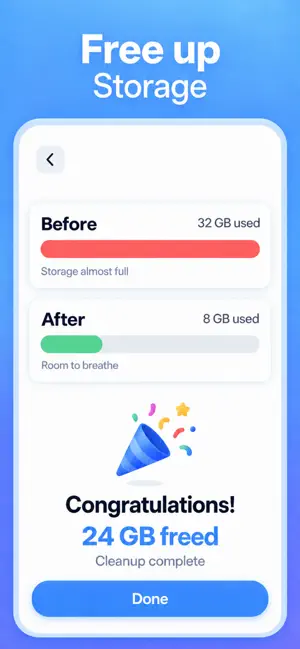
See what is really filling your iPhone, delete it in bulk, then let the rest sort itself into albums.
Built by Abdullah Yılmaz
Photo Album Organizer Offline is a free iPhone app that does two jobs, in that order. First it finds what is actually filling your storage — exact duplicates, near-identical burst shots, and the photos and videos that messaging and social apps saved without asking — shows how many gigabytes each group is worth, and lets you delete them together. Then it sorts everything that is left into 14 albums you never had to create.
All of it runs on the device. There is no account, no server and no upload: Apple’s own privacy label on the App Store listing reads “Data Not Collected,” and organizing works in airplane mode. On iOS 27 Apple Intelligence adds deeper image understanding on supported iPhones. Below that, Apple’s Vision framework handles the albums, the text in your screenshots and the duplicate detection on its own — the app is not gated on having a new phone.
Screenshots

What it does
A scan that names the culprits
One pass over your library counts the duplicates, the near-identical shots and the chat media, and puts an approximate gigabyte figure on each group before you touch anything.
Duplicates and burst shots, grouped
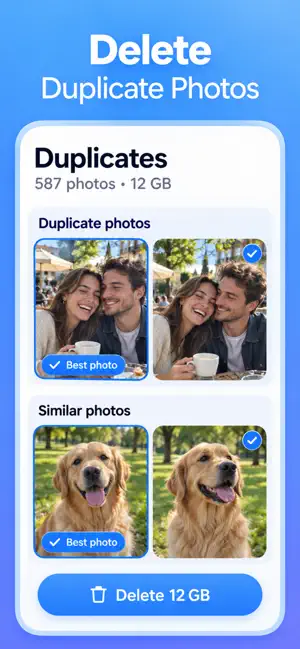
A perceptual fingerprint catches the same photo saved twice anywhere in your library, and groups bursts taken within five minutes of each other. The sharpest, largest frame is marked “Best photo” so you keep the one you wanted.
Chat and social media, by app
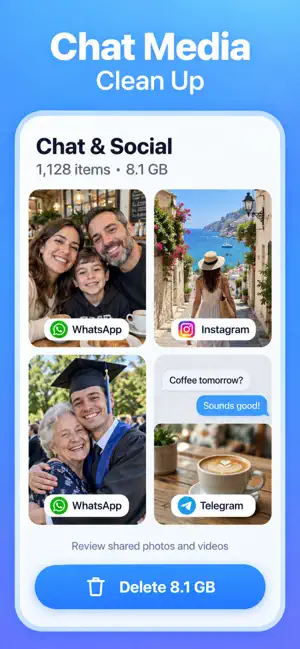
Media saved by WhatsApp, Telegram, Instagram, Snapchat, Messenger, WeChat, Signal, TikTok, Facebook, Pinterest and Discord is collected per app. Review years of forwarded memes in one place instead of scrolling past them.
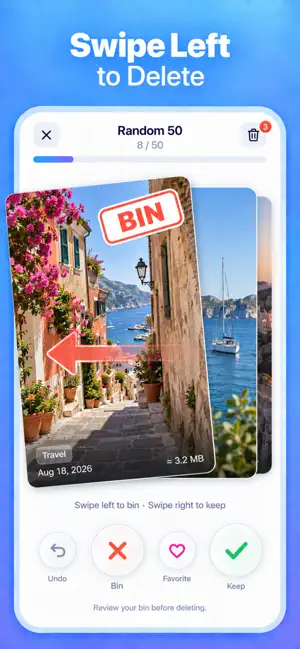
Swipe to sort, with a bin that forgives
Right to keep, left to the bin, double-tap to favourite, and undo when you are too quick. Work in batches of 50, month by month, by largest videos, or through old screenshots. Nothing is deleted until you empty the bin.
14 albums that build themselves
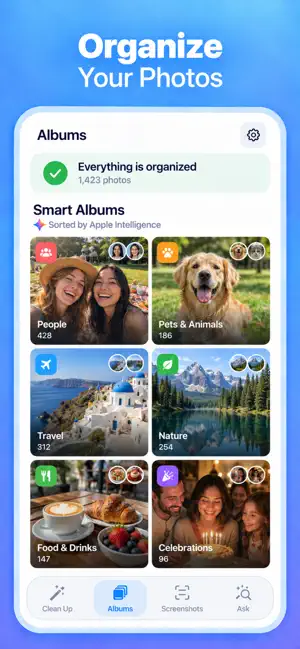
People, Pets & Animals, Food & Drinks, Nature, Travel, City & Places, Celebrations, Sports & Fitness, Vehicles, Documents, Home, Art & Design, Things & Shopping, and Everything Else — plus Favorites, Portraits, Live Photos, Panoramas, Photos with Text and On This Day. Any album exports into Apple’s Photos app in one tap.
Screenshots sorted and readable
Screenshots are grouped by what is in them — receipts, tickets, chats, articles, passwords — and the text inside them is recognised on device. Read it as a list, copy a single line, or share a whole group. Status bars and button labels are filtered out so you copy the part you meant.
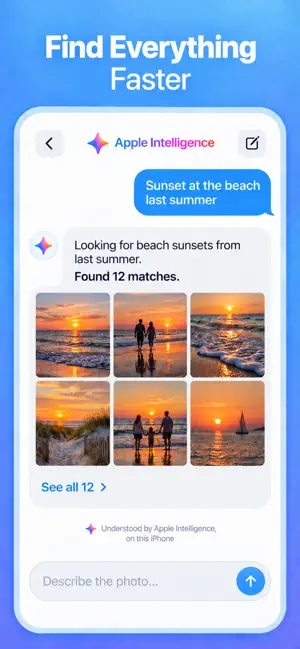
Search in your own words
“Sunset at the beach last summer.” “Receipt screenshots from last month.” “Screenshot with a Wi-Fi password.” When a query matches too much, the app asks one short question — which year, a photo or a screenshot — instead of dumping hundreds of results on you.
Private because there is nowhere to send it
The app has no networking code and no third-party SDKs, asks for one permission, and stores its index in its own container rather than iCloud. The index keeps what is needed to sort and search — never the image itself — and you can delete it from Settings at any time.
How to free up photo storage on your iPhone in four steps
-
Scan the library once
Let the app read your library in a single pass. It counts the duplicates, the near-identical shots and the media other apps saved, and shows roughly how many gigabytes each group is worth. Nothing is deleted at this stage — the scan only tells you where the space went.
-
Clear the duplicates first
This is the space nobody misses. Each group keeps one photo, marked “Best photo” by sharpness, resolution and whether you favourited it, with ties going to the original. Check the picks, then delete the rest together.
-
Empty the chat and social buckets
Media that WhatsApp, Telegram, Instagram, Snapchat and eight other apps saved for you is grouped per app. These are forwarded memes and group-chat screenshots you never chose to keep, so review them in one place instead of scrolling past them for years.
-
Swipe through the rest, then empty the bin
Work in batches of 50 or month by month: right to keep, left to the bin, undo when you are too quick. Emptying the bin hands the deletions to iOS, which asks for confirmation itself. What survives is sorted into albums you can export into Apple Photos in one tap.
When to use it
- “Storage Almost Full” keeps coming back and you have no idea which photos to delete.
- Years of forwarded memes, group-chat screenshots and saved videos are sitting in your library and you never chose to keep any of them.
- You took forty shots of one moment and only want the sharp one.
- You need the Wi-Fi password, the boarding pass or the receipt you screenshotted months ago and cannot scroll back to it.
- You want albums for your pets, your food, your travel and your documents without building a single one by hand.
- You want your library tidied without it being uploaded anywhere to make that happen.
What fills up photo storage on an iPhone, and what to do about it
| What it is | Why it adds up | What to do |
|---|---|---|
| Exact duplicates | The same image saved twice — re-downloaded, sent back to you, or saved out of a chat | Delete all but one; there is no downside |
| Burst and near-identical shots | Eleven frames of a moment you only wanted once | Keep the sharpest, bin the rest |
| Chat and social media | Messaging apps save incoming photos and videos automatically | Review per app, clear in bulk |
| Screenshots | Kept “just in case” and never opened again | Read the text, keep what matters |
| Videos | One minute of 4K can outweigh hundreds of photos | Sort by largest and decide there first |
| Recently Deleted | Deleted photos keep their space for 30 days | Empty it in Photos to reclaim the space now |
Frequently asked questions
Does the app upload my photos anywhere?
No. Every photo is analysed on your iPhone. There is no account to create, no server behind the app, and the App Store privacy label reads “Data Not Collected.” Organizing works with the device in airplane mode.
Is Photo Album Organizer Offline free?
Yes. The automatic albums, screenshot sorting, the text recognised in your screenshots and search in your own words are free, along with 50 deleted photos a day. Premium lifts the daily limit, opens every screenshot in one text view with a one-tap export, and adds Apple Intelligence image understanding. It starts with a 7-day free trial, and there is a one-time lifetime option instead of a subscription.
Can it delete something without asking me?
No. Swiping left only moves a photo to the app’s own bin, where you can restore it. Emptying the bin hands the deletion to iOS, which asks for confirmation itself, and the photos then sit in Recently Deleted for 30 days. Nothing is removed silently at any stage.
Do I need Apple Intelligence or iOS 27?
No. On iOS 18 and later, Apple’s Vision framework does the albums, the screenshot text recognition, the duplicate detection and the search. On iOS 27 with a supported iPhone, Apple Intelligence layers on deeper image understanding, richer search and photo descriptions — it makes the results better rather than making the app work.
How does it find duplicate photos?
It builds a small perceptual fingerprint for each image, so two copies match even if one was re-saved, re-downloaded or sent back to you at a different size. Photos with almost identical fingerprints are exact duplicates; near matches taken within five minutes of each other are grouped as burst shots. A crop is checked against the original’s proportions so it is not offered up as a duplicate.
Will it throw away the good version of a photo?
The keeper is chosen from sharpness, resolution, whether you favourited it and whether it came from your camera, with ties going to the oldest copy — and it is labelled “Best photo” in the group. You can override it, and everything you delete is recoverable for 30 days.
Can I get the albums into Apple’s Photos app?
Yes. Any album can be written out as a real album in Photos with one tap. On iOS 27 the app can also write its keywords onto the photos themselves, so they turn up in Apple’s own Photos search — that is off by default and you turn it on in Settings.
Which devices and languages does it support?
It needs iOS 18 or later on iPhone, and also runs on a Mac with an M1 chip or later (macOS 15+) and on Apple Vision Pro (visionOS 2+). The app is available in English, Turkish, Traditional Chinese, French and Spanish, and you can switch its language inside the app without changing your device language.
Are the gigabyte figures exact?
They are close estimates, and the app shows them with a “≈” for that reason. iOS does not give apps a public file size for each photo, so the app estimates from dimensions and media type. The counts of photos and groups are exact; the space figures are the honest approximation.
How much space can I actually expect to get back?
It depends entirely on your library, which is why the app shows you the number before you commit instead of promising one. Duplicates, burst shots and chat media are usually the three largest buckets. Every space figure carries a “≈” because iOS does not hand apps an exact file size for each photo.
Why is my iPhone storage still full after I deleted photos?
Because deleted photos move to Recently Deleted in Apple Photos and keep their space for 30 days. Open Photos, go to Recently Deleted and delete them permanently to get the space back straight away.
Is it safe to let an app delete my photos?
The safe pattern is the one this app follows: a reversible in-app bin, then an iOS confirmation dialog no app can bypass, then Apple’s own 30-day Recently Deleted window behind that. An app that deletes without all three stages is the one to avoid.
Does it need iCloud, an account or an internet connection?
None of the three. The analysis happens on your iPhone and works in airplane mode, and the App Store privacy label for the app reads “Data Not Collected.” It reads your existing library, including an iCloud Photos one, without changing how iCloud syncs.
Can it find a screenshot by what was written in it?
Yes. Text in screenshots is recognised on the device, so “screenshot with a Wi-Fi password” or “receipt screenshots from last month” finds the picture by its contents rather than its date. Screenshots are also grouped by kind — receipts, tickets, chats, articles, passwords.
What is the difference between this and Apple’s own Photos app?
Photos is built to show you your library; this is built to shrink it and then label it. It groups duplicates and bursts so they can go in bulk, attributes media to the app that saved it, reads the text in every screenshot into a list you can copy, and writes its albums back into Photos when you want them there.
Sources and further reading
- How to check the storage on your iPhone and iPad — Apple Support
- Manage your photo and video storage — Apple Support
- Delete photos on your iPhone or iPad — Apple Support
- How to recover deleted photos on your iPhone, iPad, Mac, or Apple Vision Pro — Apple Support
- Apple Intelligence — Apple
- Vision — on-device image analysis — Apple Developer Documentation
- App privacy details on the App Store — Apple Developer
Links checked September 19, 2026.
Related reading
Try Photo Album Organizer Offline
Free up gigabytes of duplicates and chat clutter, then sort the rest into albums.